
SO-DIMM MEMORY
( number of products: 473 )

Memory RAM 1x 16GB GoodRAM SO-DIMM DDR4 2400MHz PC4-19200 | W-MEM2400S416G


Memory RAM 1x 1GB GoodRAM SO-DIMM DDR3 1333MHz PC3-10600 | GR1333S364L9/1G

Memory RAM 1x 8GB GoodRAM SO-DIMM DDR3 1333MHz PC3-10600 | GR1333S364L9/8G
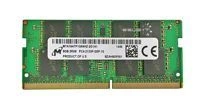
Memory RAM 1x 8GB Micron SO-DIMM DDR4 2133MHz PC4-17000 | MTA16ATF1G64HZ-2G1B1

Memory RAM 1x 2GB Kingston SO-DIMM DDR2 667MHz PC2-5300 | KTH-ZD8000B/2G

Memory RAM 1x 2GB Micron SO-DIMM DDR2 667MHz PC2-5300 | MT16HTF25664HY-667

Memory RAM 1x 8GB 2-POWER SO-DIMM DDR3 1600MHz PC3-12800 | MEM0803A

Memory RAM 1x 8GB 2-POWER SO-DIMM DDR3 1866MHz PC3-14900 | MEM5403A

Memory RAM 1x 16GB Samsung SO-DIMM DDR4 2666MHZ PC4-21300 | M471A2K43DB1-CTD

Memory RAM 1x 4GB 2-POWER SO-DIMM DDR3 1600MHz PC3-12800 | MEM5302A

Memory RAM 1x 8GB Kingston SO-DIMM DDR3 1600MHz PC3-12800 | KCP3L16SD8/8

Memory RAM 1x 32GB Crucial SO-DIMM DDR4 3200MHz PC4-25600 | CT32G4SFD832A

Memory RAM 1x 8GB GoodRAM SO-DIMM DDR4 2400MHz PC4-19200 | GR2400S464L17S/8G

Memory RAM 1x 8GB GoodRAM SO-DIMM DDR4 2666MHZ PC4-21300 | GR2666S464L19S/8G

Memory RAM 1x 16GB GoodRAM SO-DIMM DDR4 2666MHZ PC4-21300 | GR2666S464L19/16G

Memory RAM 1x 4GB GoodRAM SO-DIMM DDR3 1333MHz PC3-10600 | GR1333S364L9S/4G

Memory RAM 1x 4GB GoodRAM SO-DIMM DDR3 1600MHz PC3-12800 | GR1600S364L11S/4G

Memory RAM 1x 4GB GoodRAM SO-DIMM DDR3 1600MHz PC3-12800 | GR1600S3V64L11S/4G

Memory RAM 1x 8GB GoodRAM SO-DIMM DDR3 1600MHz PC3-12800 | GR1600S364L11/8G

Memory RAM 1x 4GB Kingston SO-DIMM DDR3 1600MHz PC3-12800 | KVR16LS11/4

Memory RAM 1x 4GB Kingston SO-DIMM DDR3 1600MHz PC3-12800 | KVR16S11S8/4

Memory RAM 1x 8GB Kingston SO-DIMM DDR3 1600MHz PC3-12800 | KVR16LS11/8

Memory RAM 1x 4GB Kingston SO-DIMM DDR4 3200MHz PC4-25600 | KVR32S22S6/4

Memory RAM 1x 8GB Kingston SO-DIMM DDR4 3200MHz PC4-25600 | KVR32S22S8/8

Memory RAM 1x 16GB Kingston SO-DIMM DDR4 3200MHz PC4-25600 | KVR32S22D8/16
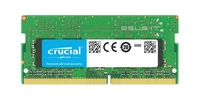
Memory RAM 1x 8GB Crucial SO-DIMM DDR4 3200MHz PC4-25600 | CT8G4SFRA32A
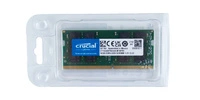
Memory RAM 1x 16GB Crucial SO-DIMM DDR4 3200MHz PC4-25600 | CT16G4SFRA32A
RAM SO DIMM what is it?
SO-DIMM RAM is one of the basic components of each laptop, which is responsible for the smooth operation of the device and improves the comfort of using various types of software. You should choose RAM bones according to your needs, keeping in mind that each laptop has different requirements. Thus, laptops or other relatively small devices use SO DIMM (small outline dual in-line memory module) type RAM dice.
SODIMM vs. DIMM - what are the differences?
DIMM-type RAM is a die primarily supported by desktop computers. It is an oblong shaped, rectangular module that always has the correct number of pins designed to connect to other components specific to desktop computers.
SO-DIMM RAM differs from the former mainly in format. A double line of memory modules enclosed in a slightly smaller format ensures that they fit into smaller hardware, including laptops. Of course, along with the change in the length of the RAM dice, other connections are also applied to fit the size of the laptop motherboard.
To make the most of a laptop's technical space, all internal components should be compressed as much as possible, hence DIMM dice will never fit into a laptop case. SO-DIMM sockets also allow for horizontal installation of RAM, whereas dice intended for desktop computers can only be mounted on the corresponding motherboard.
SO-DIMM RAM - how to choose?
You fit the SO-DIMM memory module to your device using the same key as the RAM DIMM. First, you need to know what components will be compatible with your device's motherboard - check the specifications for your motherboard model. The next issue is sizing - remember that a 32-bit system supports RAM up to 4GB. Larger capacities are designed for 64-bit systems.
RAM capacities vary and should be matched to the intended use of the equipment - for a basic home laptop, 8 - 16 GB dice will suffice, while equipment used to run a variety of programs will provide better performance when fitted with 16 GB or more RAM dice. Larger capacities handle data faster and are intended for specialist applications, suitable for those working with extensive graphics programs, among others.
However, RAM performance is closely related to the capabilities of the graphics card and the processor itself, so it is important to match the module to the capabilities of the computer.